Packshot
Introduction
Packshot studio allows to create numerous packshot of the products through various scene
Export packshot done
ZIP
This export is limited to 250 packshots. Since this export is done in the browser, limited the amount of packshot to be export limits the possibility to face a crash.
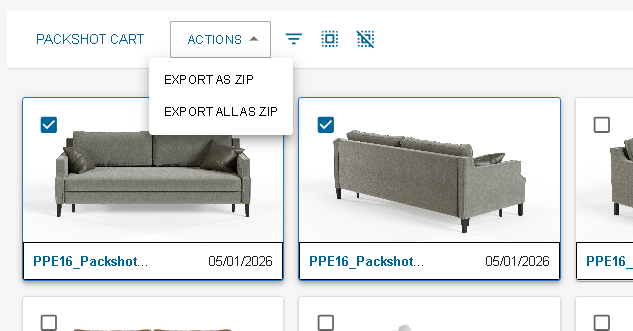
- Select packshots you want to export and then click on export or directly click on export all(you can use the filter)
- A loader appears which can take some time depending on the number of packshot you selected.
- The zip is downloaded and can be unzip it to get the packshots.
There is an excel inside the zip! The excel is here to give all the data around the packshots exported:
- Packshot file: the file name (to identify the packshot).
- Packshot ID: id of the packshot in 3dcloud.
- Order ID: id of the order the packshot was created from.
- Product ID: id of the product in the packshot.
- Product reference: reference of the product in the packshot.
- Scene: Scene with which the packshot was created with.
- Parameters: Values of the parameters for the product in the packshot (only parameters different from default are displayed)
Export Packshot Cart
Packshot cart creation can be handle through excel. From the product selection to the packshot cart the current status of the packshot cart, the user can export the packshot to update them or create new ones.